
Description
Warehouse Inventory Management Software with Barcode Scanners
Wasp InventoryCloud is warehouse inventory management software with barcode scanner integration that gives businesses better control over stock quantities, storage locations and inventory movements.
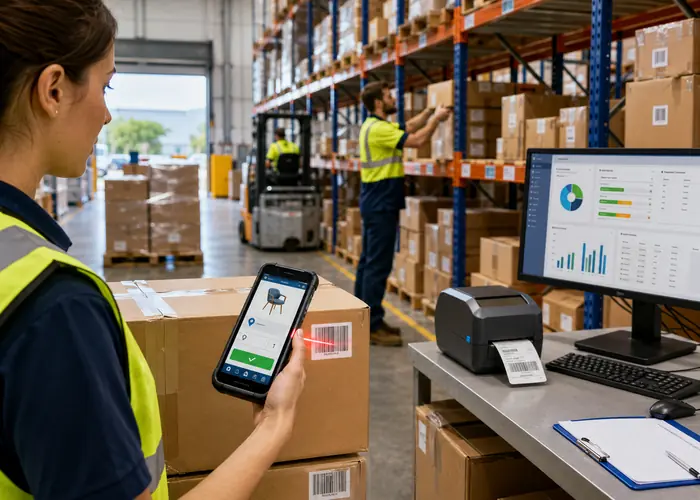
Instead of relying on spreadsheets, handwritten records or disconnected systems, warehouse employees can scan inventory as it is received, moved, counted, audited, picked or removed. Each transaction updates the inventory record, helping your business maintain accurate stock information and reduce manual data-entry errors.
InventoryCloud is suitable for warehouses, distribution centres, manufacturers, wholesalers, retailers, stockrooms and other organisations that need to know what inventory they have and where it is located.
Barcode-Based Warehouse Stock Control Software
Barcode scanning helps warehouse employees record inventory activity at the point where it happens.
Using a compatible PDA barcode scanner or mobile device, employees can:
- Receive new inventory
- Add and remove stock
- Move inventory between storage locations
- Complete stocktakes and cycle counts
- Perform inventory audits
- Look up quantities and locations
- Track serial numbers, lot numbers and date codes
- Print item and location barcode labels
- Record who completed each inventory transaction
- Pick and verify orders with Complete and Enterprise editions
This helps reduce incorrect stock quantities, misplaced products, picking mistakes and time spent correcting manual records.
InventoryCloud Features Included Across All Editions
The Basic, Complete and Enterprise editions include:
- Cloud or on-premise hosting options
- Mobile application
- Support and maintenance
- Item, customer and vendor records
- Custom fields
- Unit-of-measure conversion
- Serial number tracking
- Lot and date-code tracking
- Loan-out inventory
- Item label printing
- Minimum and maximum stock levels
- Inventory audits
- Custom user roles and permissions
- CSV import and export
- More than 30 pre-built reports
- Email notifications
The correct edition will depend on your number of users, warehouses, reporting requirements and required order-management functions.
Choose the Correct InventoryCloud Edition
InventoryCloud Basic
The Basic edition is designed for smaller operations requiring straightforward barcode inventory control.
It includes:
- 1 user
- 1 site or warehouse
- Cloud or on-premise hosting
- Mobile app
- Barcode stocktake and auditing
- Serial, lot and date-code tracking
- Minimum and maximum stock levels
- Item label printing
- More than 30 pre-built reports
- Email notifications
- Support and maintenance
Basic does not include multiple warehouses, purchase orders, pick orders, custom report design, REST API or ecommerce integrations.
InventoryCloud Complete
The Complete edition is intended for growing businesses requiring multiple warehouses and more advanced inventory processes.
It includes:
- 5 users
- Multiple sites and warehouses
- Cloud or on-premise hosting
- More than 60 pre-built reports
- Purchase orders
- Pick orders
- Packing slips and invoices
- Bill of materials and assemblies
- Kits
- Audit windows
- Non-diminishing products
- Supplier-based low-stock checking
- Customised labels
- Custom report designer
- Custom notifications
- Scheduled reporting
- SSO
- REST API
Ecommerce and ShipStation integrations are available as optional add-ons.
InventoryCloud Enterprise
The Enterprise edition is designed for larger organisations with more users, multiple warehouses and greater hosting or security requirements.
It includes:
- More than 30 users
- Multiple sites and warehouses
- Cloud hosting
- On-premise hosting
- Private Cloud availability
- More than 60 pre-built reports
- Complete purchasing and picking functions
- Advanced reporting and notifications
- SSO
- REST API
- All other advanced InventoryCloud functions
Ecommerce and ShipStation integrations are available as optional add-ons.
Download the 2026 Wasp InventoryCloud Feature Matrix
View InventoryCloud Function Demonstration Videos
Receiving and Inventory Put-Away
InventoryCloud helps control the receiving process from the moment goods arrive.
Employees can scan products, confirm quantities and allocate stock to the correct warehouse, aisle, shelf, bin or other storage location. Barcode validation helps ensure the correct product is received and stored in the correct location.
Complete and Enterprise editions also provide purchase-order functions for managing expected inventory, suppliers and receiving requirements.
Stocktake and Cycle Counting
Warehouse employees can use barcode scanners to complete full stocktakes or smaller cycle counts.
Counted quantities can be recorded from the warehouse floor and compared with the quantities held in InventoryCloud. The software provides a clearer transaction history and audit trail than handwritten records or separate spreadsheets.
Regular cycle counting also allows sections of inventory to be checked without closing the entire warehouse for a major annual stocktake.
Picking and Order Accuracy
Complete and Enterprise editions support barcode-based pick orders.
Warehouse employees can scan products while picking to confirm they have selected the correct item. This helps identify mistakes before goods reach the packing or dispatch area, reducing incorrect shipments, returns and order corrections.
These editions also include packing slips, invoices, purchase orders, bills of materials, assemblies and kits.
Multi-Site Warehouse Inventory Tracking
Complete and Enterprise editions provide centralised visibility across multiple warehouses, stockrooms and storage locations.
Authorised users can review inventory quantities and movements without maintaining separate spreadsheets for each warehouse.
Inventory can be tracked by:
- Warehouse or site
- Storage location
- Item or SKU
- Serial number
- Lot or batch number
- Date code or expiry date
- Customer
- Purchase order
- Transaction type
The Basic edition supports one site or warehouse.
Low-Stock Alerts and Replenishment
All editions allow minimum and maximum stock levels to be established, helping businesses identify items that require replenishment.
Complete and Enterprise editions add purchase orders, vendor-based low-stock checking, custom notifications and other advanced purchasing functions.
These tools help reduce stock shortages while avoiding unnecessary over-ordering.
Inventory Reporting
All editions include more than 30 pre-built reports covering inventory quantities, locations, transactions and audits.
Complete and Enterprise editions provide more than 60 pre-built reports, along with:
- Custom report designer
- Scheduled reporting
- Custom notifications
- Reports across multiple sites and warehouses
This allows managers to review stock levels and inventory activity without manually combining information from separate spreadsheets.
Cloud, On-Premise or Private Cloud
Basic, Complete and Enterprise editions are available with cloud or on-premise hosting.
Cloud hosting provides access without requiring the business to host its own server. An on-premise configuration may suit organisations with specific internal IT or data-hosting requirements.
Private Cloud hosting is available exclusively with the Enterprise edition.
All editions are subscription products billed annually, with support and maintenance included.
Ecommerce and Software Integrations
Complete and Enterprise editions include REST API access for approved custom integrations.
Ecommerce integration and ShipStation integration are available as optional add-ons for Complete and Enterprise. These integrations should be assessed against your existing ecommerce, accounting, ERP or order-management platform before purchase.
Compatible Barcode Scanners, Printers and Labels
Track n Trace Solutions can provide the supporting hardware required for a complete warehouse inventory barcode system.
Available equipment includes:
- Rugged PDA barcode scanners
- Warehouse barcode scanners
- Barcode and label printers
- Barcode labels and thermal label rolls
- Charging cradles, pistol grips and protective accessories
We can help match InventoryCloud with suitable hardware based on your warehouse environment, scanning distance, Wi-Fi coverage, daily workload and required operating system.
Australian Setup and Support
Track n Trace Solutions provides Australian assistance with software selection, barcode hardware, configuration and implementation.
We can review your current inventory process, number of users, warehouse locations, reporting requirements, barcode hardware and integration needs before recommending an InventoryCloud edition.
Call 1300 808 412, request a quote or book a free consultation to discuss your requirements.
Frequently Asked Questions
What is warehouse inventory management software?
Warehouse inventory management software records stock quantities, storage locations and inventory movements. It replaces manual records and disconnected spreadsheets with one central system for receiving, counting, transferring, picking and reporting.
Can InventoryCloud work with barcode scanners?
Yes. InventoryCloud supports barcode scanning through compatible mobile devices and dedicated barcode hardware. Rugged PDA barcode scanners are generally better suited to frequent warehouse scanning than consumer phones.
Can InventoryCloud manage more than one warehouse?
Complete and Enterprise support multiple sites and warehouses. Basic supports one site or warehouse.
Can InventoryCloud be used for stocktaking?
Yes. All editions support inventory audits. Employees can use barcode scanners to conduct stocktakes and cycle counts and compare counted quantities with existing inventory records.
Is InventoryCloud available in the cloud and on-premise?
Yes. All three editions offer cloud and on-premise hosting. Private Cloud hosting is available with Enterprise.
Does InventoryCloud support receiving and order picking?
All editions support inventory transactions and receiving. Purchase orders, pick orders, packing slips and invoices are available with Complete and Enterprise.
Are ecommerce integrations included?
Ecommerce and ShipStation integrations are available as optional add-ons for Complete and Enterprise. They are not automatically included with the standard subscription.
Is InventoryCloud a complete warehouse management system?
InventoryCloud is designed primarily for barcode-based inventory and warehouse stock control. It can suit businesses requiring receiving, location tracking, stocktake, picking and reporting without the complexity of a large enterprise WMS. Businesses requiring advanced warehouse automation or extensive ERP integration should have their requirements reviewed before selecting an edition.


